

Reviewers
Reviewers are members of your organization assigned to evaluate candidates on a job. Only assigned reviewers can review applications and evaluate candidates.
Adding reviewers
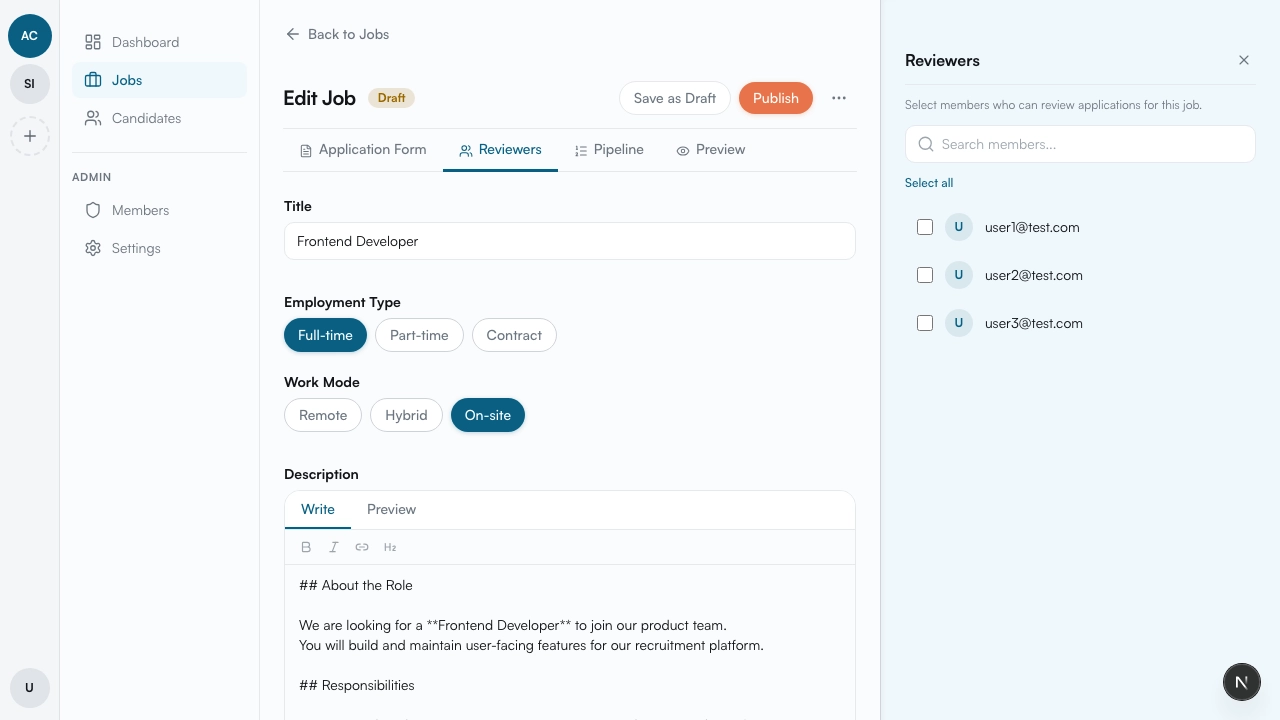
Section titled “Adding reviewers”On the job edit page, click the Reviewers button. A panel opens where you can search for and add members of your organization.
- Search for a user — type a name or email in the search field
- Add them — click on a user to add them as a reviewer
- Remove them — if you no longer need a reviewer, you can remove them from the list
What reviewers can do
Section titled “What reviewers can do”Once added to a job, reviewers can:
- Review candidate applications
- Evaluate candidates at each pipeline step
- See other reviewers’ evaluations
- Add notes
Coming soon
Section titled “Coming soon”We’re actively developing additional reviewer capabilities:
- Reviewers per step — assign different reviewers to each pipeline step
- External reviewers — invite people outside your organization to evaluate candidates
What’s next
Section titled “What’s next”Once reviewers are assigned, the job is ready to publish — read Publishing & Managing Jobs.